Route planner and driver app
Delivering with your own vehicles? Routes ready by morning, everything adds up by evening.
Routehive is built for companies whose own drivers visit the same customers again and again: wholesalers, bakeries, HoReCa suppliers, water delivery. The dispatcher plans in the browser, the driver runs the route on their phone, and in the evening cash, crates and proof of delivery are all in one place.
- Nothing to install, any phone
- Unlimited drivers on every plan
- Free trial, no credit card
- Data stored in the EU

Who it's for
Wherever the same customers have to be visited in order, again and again
Drinks wholesaler
Weekly fixed routes, crate balance per customer, cash on delivery per driver.
Bakery
The same route every early morning, delivery windows at the cafés, crates back.
HoReCa supplier
Last night's orders from Excel, dispatch by morning, a photo of the goods left.
Bottled water and coolers
Fixed routes for regular addresses, empty bottles taken back and counted.
Laundry and textile service
Pickups and drop-offs on one route, a signature at handover.
Online shop with its own drivers
Delivery windows, cash on delivery, photo and signature for fragile or chilled goods.
A delivery day
Every feature, in the order it comes up during the day
The examples follow a fictional drinks wholesaler with 6 vans and 160 restaurants, bars and shops a day. It works the same way for a bakery, a water supplier or a laundry.
Once, at the start
Customers, vehicles, team
What you record once, the system reuses every day.
- Customers (address book)
- Regular addresses added once: contact, phone, delivery time window, default cash on delivery, crates, your own ID. One click puts them into a route.
- Exact location
- If an address only resolves to the street (a new industrial park, say), drag the pin to the right spot on the map, and the customer record remembers it.
- Vehicles by licence plate
- A vehicle list with capacity for crates, pallets and parcels. Choose the route's vehicle independently of the driver; daily assignment uses the driver's default vehicle and warns if a vehicle is on two routes that day.
- Crates, items, pallets, parcels
- One address can have several units, for example 2 pallets and 5 parcels. In Settings you choose which units your company uses.
- Driver details
- Default vehicle, internal note. Make a leaver inactive: they cannot sign in, but their routes stay.
Example
Regular buyers are added as customers, with a contact and a delivery time window. For the café in the city centre they set deliveries between 6 and 8 am only, and drag the pin to the rear goods entrance. The six vans go on the vehicle list with their crate capacity.
The afternoon before
The addresses come in
Orders come from where they are today: a spreadsheet, the customer list or a repeating template.
- Import from Excel, CSV and Google Sheets
- It recognises the address, name, contact, phone, cash on delivery, crate, order number and EKÁER columns on its own. It also works from a pasted list.
- Fixed routes that repeat
- Weekly B2B rounds as templates. They create themselves on the chosen days, in advance, as drafts, and never twice for the same day.
- Pickups and drop-offs
- One pickup point and many addresses, or many pickups and drop-offs: a shipment is always picked up before it is dropped off, in the same vehicle. Add shipments by hand, from Excel or by pasting.
- Trip number
- Next to the order number and the EKÁER number, a trip number can be added to each address; it comes from imports too, the driver sees it and it is in the export.
Example
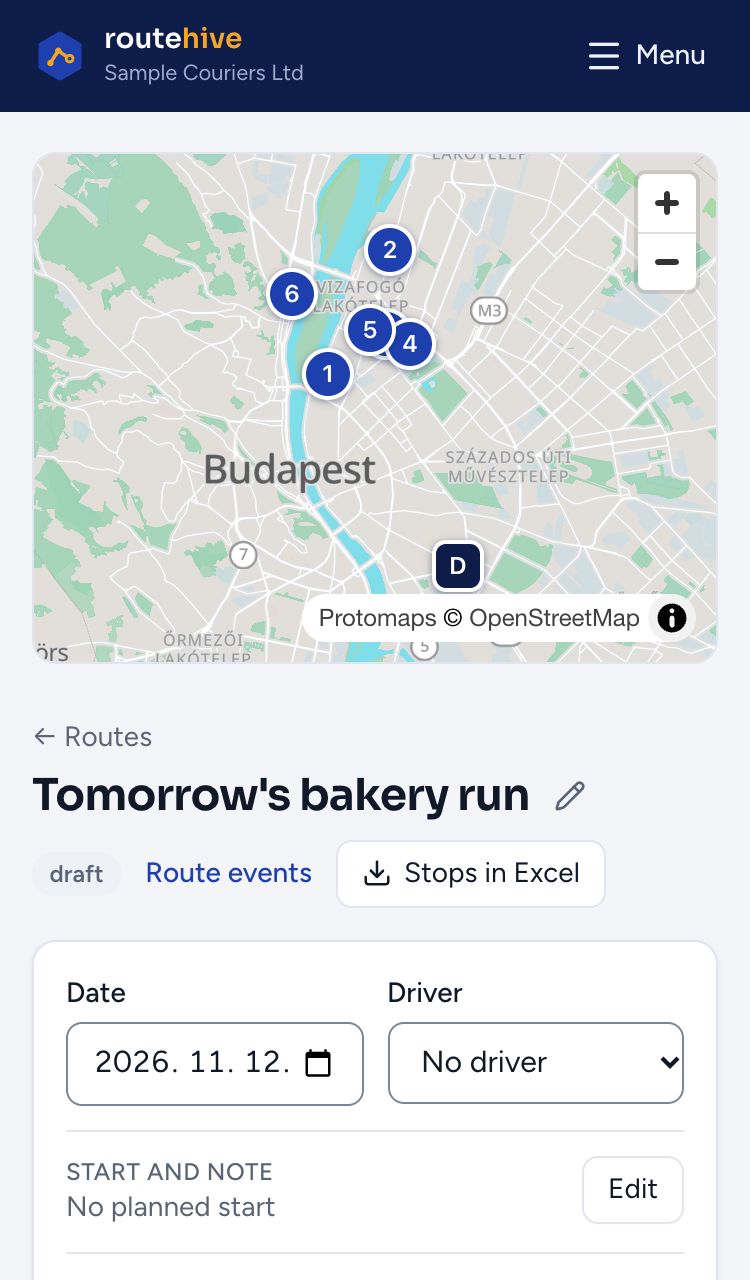
At 4 pm, 112 rows arrive from the ordering system in Excel, with cash on delivery and crate counts. The 48 addresses of the Tuesday and Friday fixed routes are already waiting as drafts. After the upload, every address is on the map.
The evening before
Order and dispatch
In the evening the dispatcher sends out tomorrow in a few minutes, and sees what does not fit.
- Route optimisation
- Orders the addresses on the real road network across Europe, up to 500 in one route. Locked stops stay where they are; the rest arrange around them.
- Daily dispatch across drivers
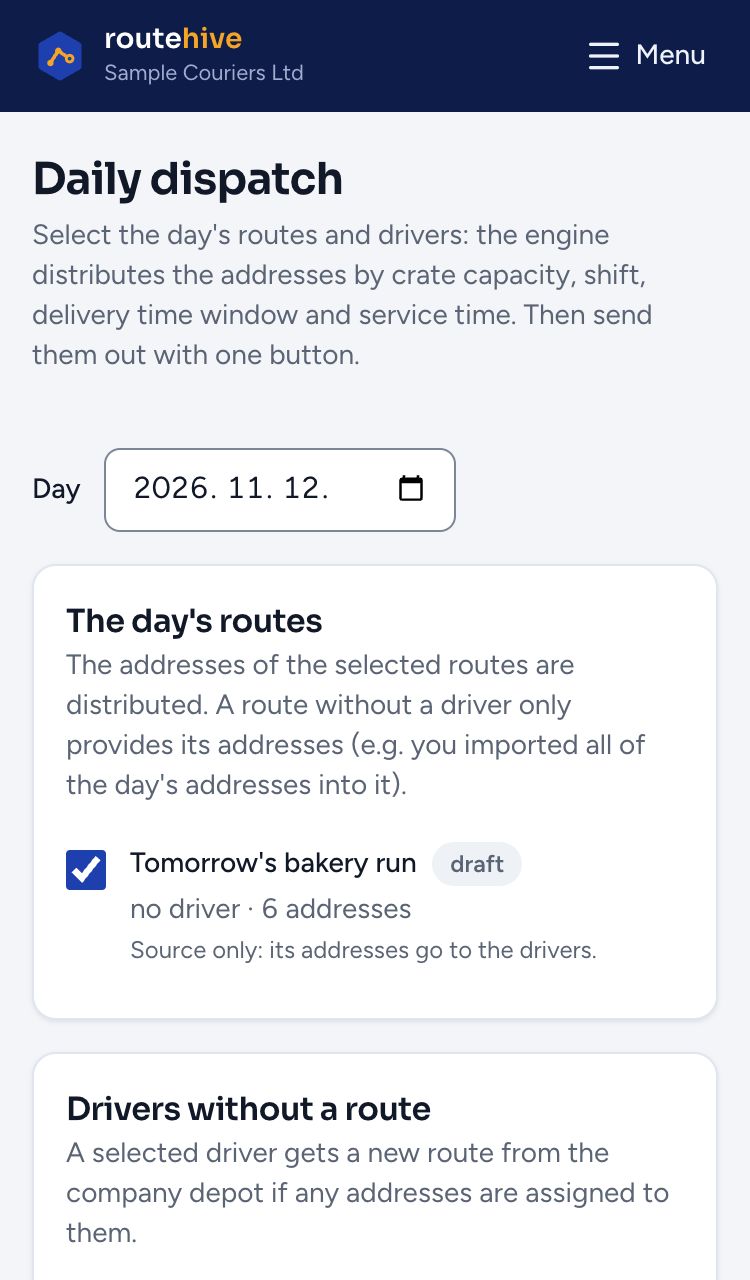
- Splits the day's addresses between drivers in one click, by vehicle capacity (crates, pallets, parcels), shift, delivery time window and service time per address. What does not fit is listed; the split can be undone for 24 hours, and addresses can be moved between routes by hand. Capacity counting can be switched off if load space does not matter. By default it balances the workload; if you choose the shortest total time, a driver's route is at most 8 hours without a shift end.
- Manual order
- When the driver knows the area better: drag the addresses, or use the up and down arrows on a phone, and send the route in your own order.
Example
The 160 addresses are split across six vans by crate capacity and time windows. Seven addresses do not fit: they show in a separate list, and two are moved by hand to the afternoon route. The market only lets vans in after 7, so that address is dragged to the end of the route.
Morning, departure
The route on the driver's phone
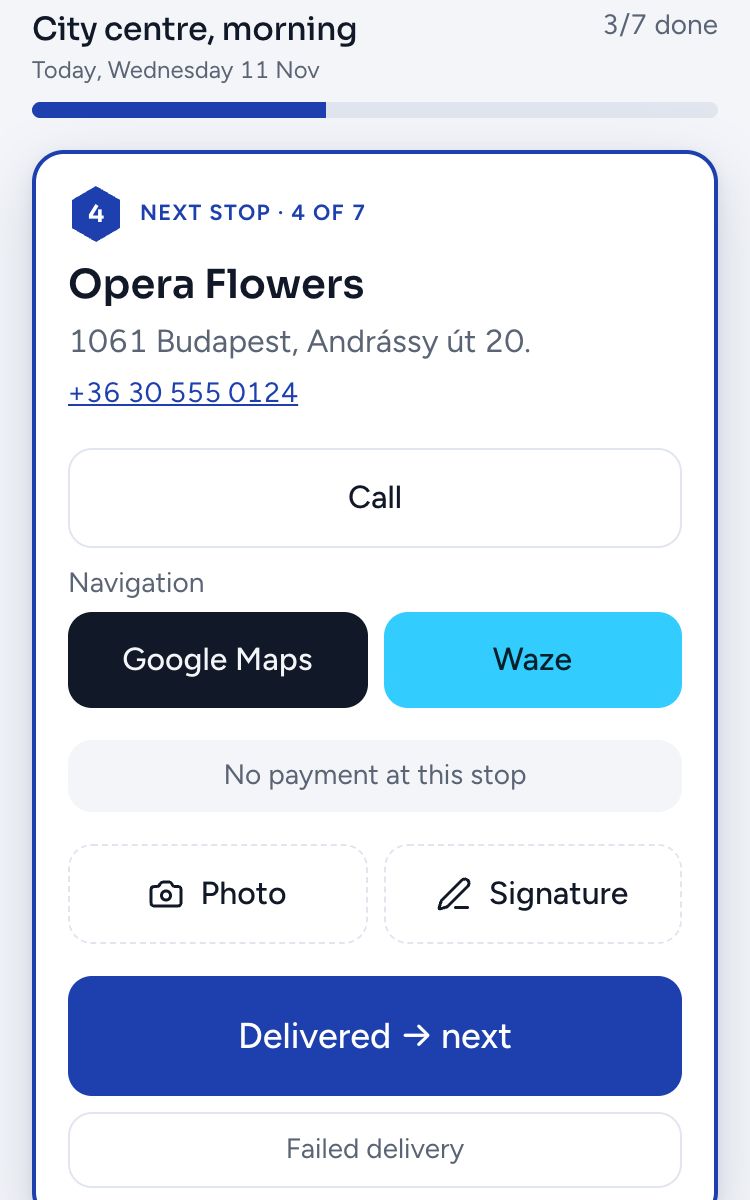
Usable one-handed, on the move: only ever the next stop, with big buttons.
- Nothing to install
- It opens in the browser and can be added to the home screen. Works on Android and iPhone; no app store download.
- Navigation in the usual map
- One tap opens Google Maps or Waze with the next address. With several addresses, the whole route. Every remaining stop also has one-tap call, Google Maps and Waze buttons.
- In the driver's language
- Dispatchers and drivers each choose their own language, from 24 languages: a colleague from abroad sees the buttons and the failure reasons in their own language.
Example
At 6 am the driver opens the route on their own phone, checks today's 27 addresses, and starts Waze to the first stop with one tap.
On the road
Closing stops, proof, cash and crates
Every stop ends with a decision, and the dispatcher in the office sees it at once.
- Delivered or failed
- The driver picks the failure reason from a list (nobody there, closed, address not found, refused, ran out of time) and can add a note.
- Photo and signature
- Up to five photos per stop and the recipient's signature on the phone, with a name. The phone compresses photos before uploading.
- Cash on delivery and crates
- A stop with payment due can only be closed once payment is marked. Returned crates are recorded as a number.
- Pickup and drop-off for the driver
- On a shipment route the driver sees where to load and where to deliver. A drop-off can only be closed after its pickup, and if the pickup fails, the drop-off is marked failed automatically.
- Re-planning on the road
- If the day goes sideways, the remaining stops can be re-planned from the last one closed.
- Works on a weak signal
- With no signal the app says so and never saves anything halfway. On a slow network a double tap or a resend still counts only once.
- Live overview in the office
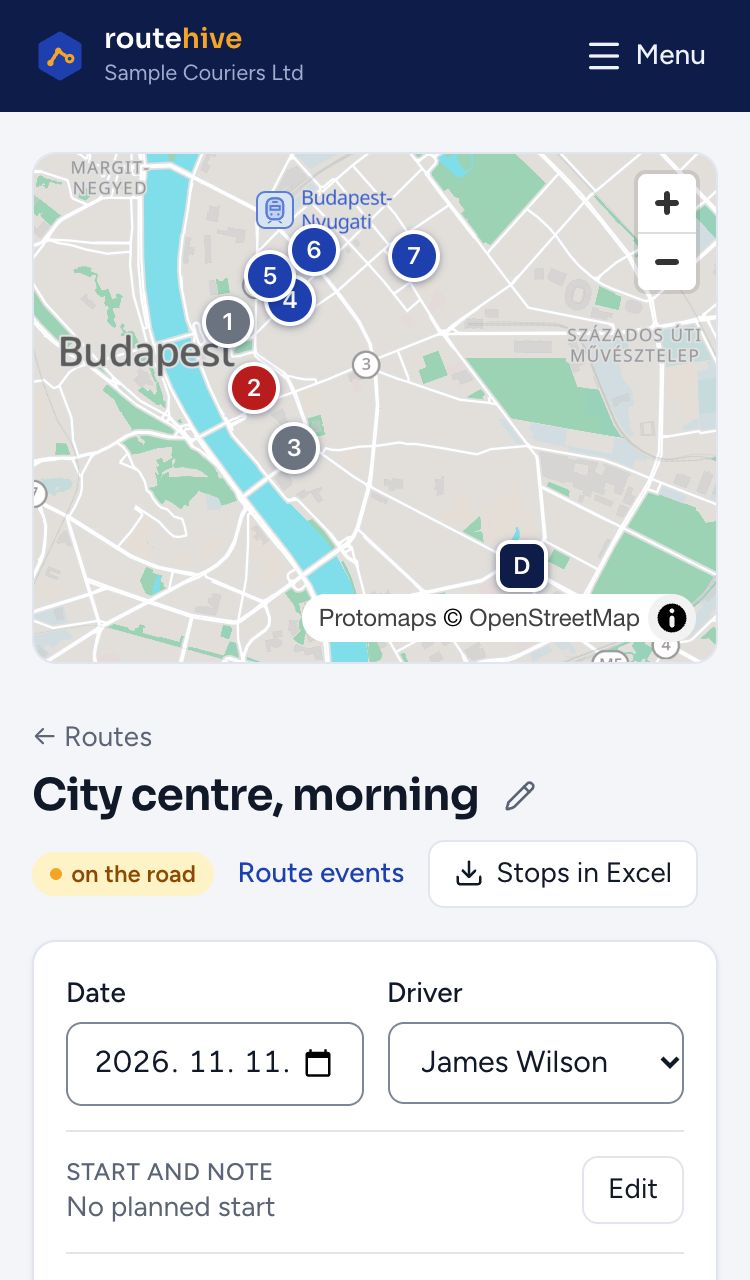
- The dispatcher sees where each route stands: delivered, failed and remaining stops on the map, and where the driver is right now.
Example
The corner bar is closed: the driver closes the stop with the reason “closed” and a note. At the next restaurant they mark the €120 cash on delivery as paid and record 3 empty crates returned. Traffic on the bridge: they re-plan the remaining 9 stops.
Evening
Settling up and reports
Cash, crates, proof and performance, without chasing anyone by phone afterwards.
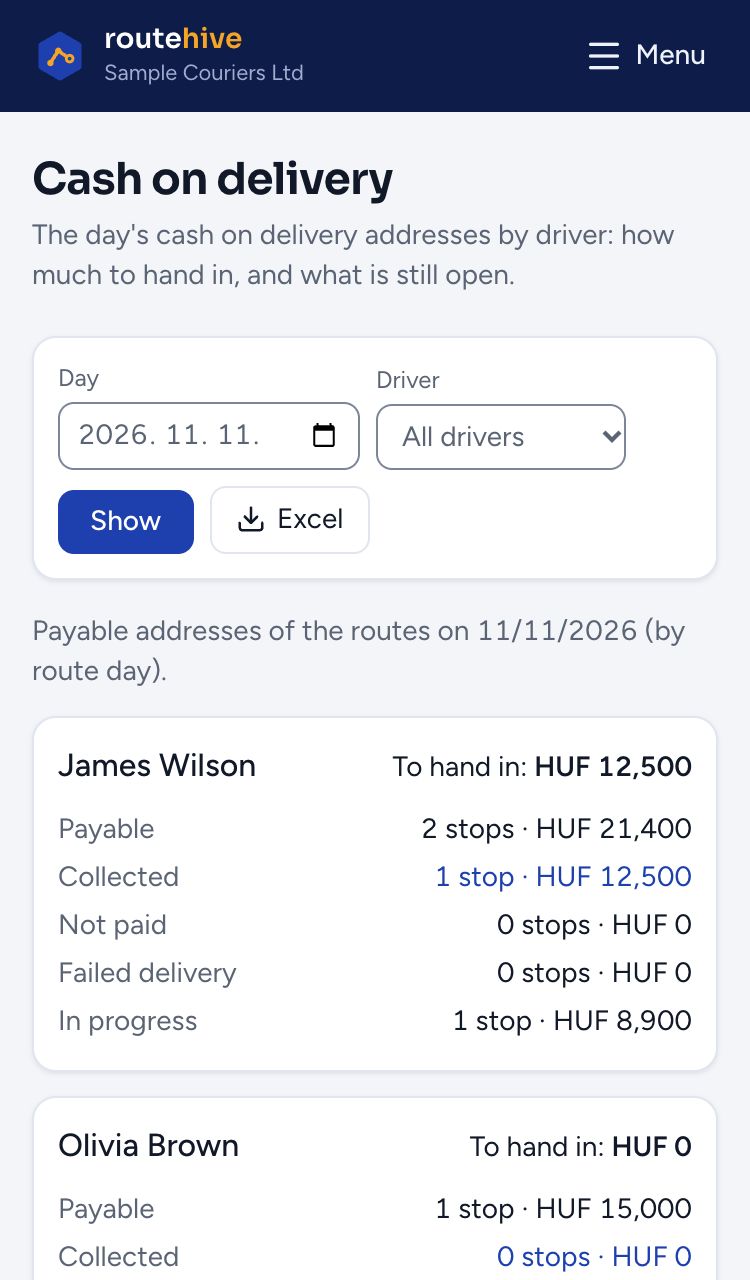
- Cash on delivery per driver
- Who collected how much, and who still holds cash. It counts for the driver who closed the stop, even if the route was handed over during the day.
- Crate balance
- Crates out at each customer. Manual corrections can be recorded too, with a reason.
- Delivery log
- Every close, reopen and failure with the time and the name of whoever recorded it. Filter by day and driver, export to Excel.
- Reports
- Delivery rate, failure reasons, planned distance, cash collected, time per stop, and how many deliveries fell outside the time window.
Example
At 6 pm the dispatcher sees that the six drivers collected €3,250 in cash on delivery, and who still has cash to hand in. The crate balance shows 14 crates out at the restaurant on Main Street. On Monday the report shows that half of the failed stops were “closed”, so their time windows are changed.
Always
Security and access
The company owner decides who can do what.
- Roles
- Owner, admin, dispatcher, driver. A driver sees only their own routes; a dispatcher sees every route of the company.
- Several companies, one account
- Someone who works for more than one company switches between them with one login.
- Two-step sign-in
- With an authenticator app and backup codes, available on any account.
- Set up for your country
- At sign-up the time zone, currency and unit follow your country: cash on delivery in your company's currency (euro, forint, złoty, lei and more), distances in kilometres or miles. You can change them in Settings.
- Data in the EU
- The database, the photos and the cache all run on storage under EU jurisdiction.


The examples are about a fictional company. The screenshots come from the real app, with sample data.
Pricing
Every feature on every plan, the price depends on the number of stops
Drivers and dispatchers are unlimited. A stop is an address on a route sent to a driver. Prices are monthly, excluding VAT.
Free
To try it: two real routes, with drivers and optimisation.
€0/ month
to try it
15 stops in totalthen a paid plan
Start freeStart
One vehicle, one route a day.
€25/ month
+ VAT
500 stops a monththen €0.05 / stop
Try it- Most companies pick this
Business
Two to four drivers, several routes a day.
€63/ month
+ VAT
2,000 stops a monththen €0.05 / stop
Try it Pro
Five to ten drivers, many regular customers.
€125/ month
+ VAT
6,000 stops a monththen €0.05 / stop
Try itFleet
Over ten drivers, high volume.
€225/ month
+ VAT
15,000 stops a monththen €0.01 / stop
Try it
Work does not stop when you reach the allowance: the price of extra stops is on each plan card. If a bigger plan would be cheaper, we tell you. Above 30,000 stops a month we make a custom offer.
The Free plan needs no credit card and no contract.
For comparison: 6 vans with 160 addresses a day and 22 working days a month make about 3,500 stops. The cheapest plan for that: Pro, €125 a month for the whole team.
On every plan
- Unlimited drivers and dispatchers
- Route optimisation and manual ordering
- Driver app for any phone
- Proof of delivery: photo and signature
- Cash on delivery and crate tracking
- Fixed routes that repeat on set days
- Import from Excel, CSV and Google Sheets
- Reports and Excel export
- Two-step sign-in, data stored in the EU
Getting started
Live in one afternoon
Sign up
A few minutes on routehive.eu. The Free plan is live at once, no credit card.
Upload your address list
Upload your current Excel or Google spreadsheet; the sample file shows which columns it recognises.
Send the first route
Drivers get their sign-in details, log in on their phone and can start the route.
We'll show you on your own address list
Send us a current daily list and we'll show you how it would look in Routehive: order, dispatch, driver view. Questions? Call or write to us.
- info@routehive.eu
- Phone
- +36 30 494 8375